
Download Toolwiz Time Freeze – time freeze, pc protection, system safety, secure environment, test software, data safety, system changes, risk-free testing, frozen zone, protect pc, safe testing, freeze changes, software testing, system restore, protect system
Overview
Toolwiz Time Freeze is a specialized utility designed to create a secure, isolated environment for testing software and making system changes on Windows-based computers. The application enables users to explore new programs, update system configurations, or experiment with software installations without the risk of permanent alterations or data loss. By leveraging a "frozen zone" concept, the tool ensures that all modifications—whether file changes, registry edits, or software installations—are reverted upon system restart, leaving the original system state intact.
Designed for both novice and experienced users, Toolwiz Time Freeze eliminates the anxiety associated with potentially damaging system settings or corrupting critical files. This makes it particularly valuable for individuals who frequently test new applications, troubleshoot software conflicts, or manage multiple configurations across different devices. The tool operates silently in the background, requiring no complex setup or technical expertise, which enhances its accessibility across user skill levels.
Although the developer did not provide additional technical details about the underlying architecture or system integration methods, the application’s functionality aligns with the growing demand for lightweight, reliable system protection tools. Its ability to preserve specific files and folders while freezing others offers a balanced approach to risk mitigation. In the broader software ecosystem, Toolwiz Time Freeze fills a niche for users seeking a simple yet effective alternative to full system backups or virtual machines.
Key Features & Functionality
- Frozen Zone Environment: Creates a temporary, isolated workspace where all system changes are automatically discarded after reboot, ensuring no trace of modifications remains.
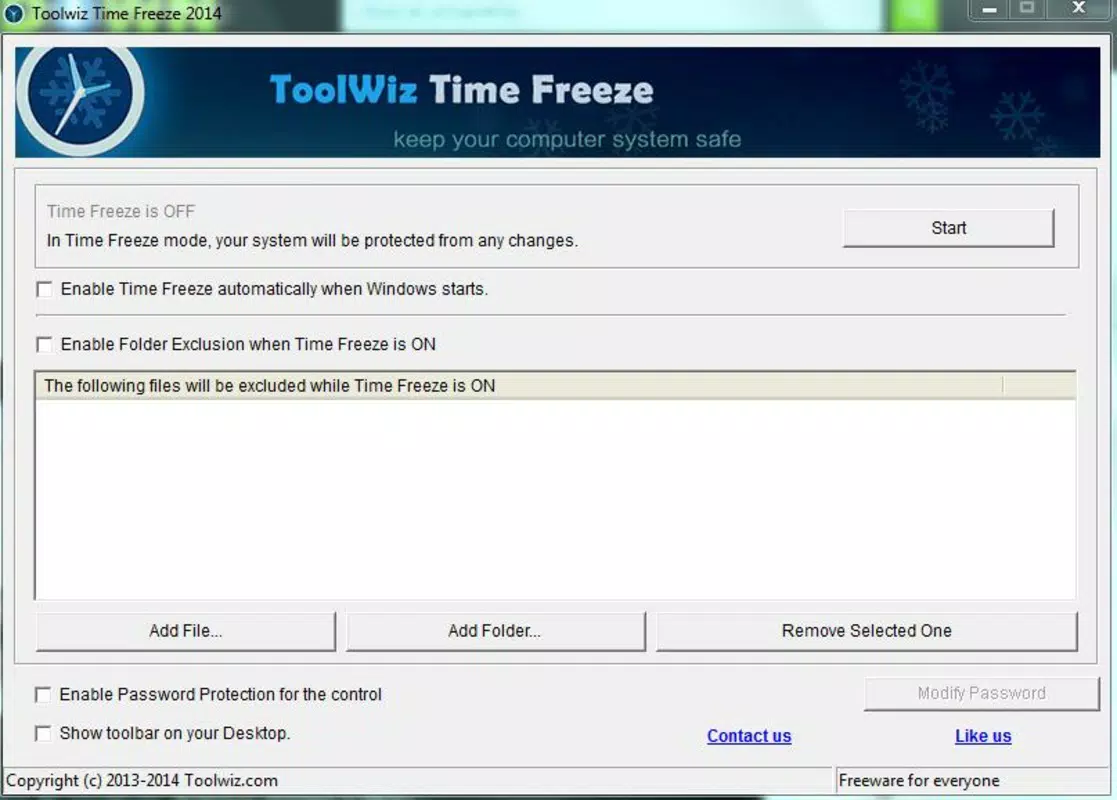
- Selective Preservation: Allows users to designate specific files, folders, or system components to retain changes, enabling the safe testing of software while protecting essential data.
- Background Operation: Runs silently without disrupting normal system performance or user workflows, requiring no active monitoring.
- Instant Reset: Upon restart, the system reverts to its pre-frozen state, providing a consistent and reliable baseline for repeated testing cycles.
- Software Testing Mode: Ideal for evaluating new applications, drivers, or system updates in a controlled, risk-free environment before permanent deployment.
For example, a user testing a beta version of a graphics driver can install it within the frozen zone. After testing, a simple restart restores the system to its original state, eliminating any risk of instability. Similarly, IT professionals can use this tool to evaluate software compatibility across multiple configurations without altering production systems. The selective preservation feature is especially useful for saving user preferences or configuration files that should not be lost during testing.
Interface, UX & Performance
Toolwiz Time Freeze features a minimalistic interface that prioritizes functionality over visual complexity. The main control panel presents essential options such as activating the frozen zone, selecting protected files, and managing preservation rules. Navigation is straightforward, with clearly labeled buttons and intuitive workflows that require minimal user input.
The application maintains a lightweight footprint, consuming only 12.4 MB of disk space, which contributes to efficient memory usage and minimal impact on system performance. Although the developer did not list formal performance metrics, the tool’s background operation suggests optimized resource handling. Users can expect stable behavior during active testing sessions, with no noticeable lag or crashes reported in the provided documentation.
Responsiveness across different device categories is not explicitly detailed, but the application’s design suggests compatibility with standard Windows configurations. Stability appears to be a core focus, as the tool relies on consistent system reset behavior to fulfill its primary purpose. No reported issues with data corruption or failed resets were mentioned in the available information.
Platform Compatibility & Technical Requirements
Toolwiz Time Freeze is designed exclusively for the Windows platform and requires a compatible Windows operating system. The current version is 2.3.1, with a file size of 12.4 MB. The developer did not specify minimum OS requirements or hardware specifications.
Given the application’s lightweight nature and background operation, it is likely compatible with a wide range of Windows systems, including those with older hardware. However, specific compatibility details such as supported Windows versions (e.g., Windows 10, 11) or required processor architecture were not disclosed. Users should exercise caution when installing on systems with limited resources or non-standard configurations.
Installation is straightforward, and the application does not appear to require administrative privileges for basic functionality. The absence of detailed system requirements means users should rely on standard Windows compatibility checks when deploying the tool.
Pros and Cons
Pros
- Creates a secure, risk-free environment for software testing and system changes.
- Supports selective preservation of critical files and folders.
- Operates silently in the background with minimal system impact.
- Offers instant reset upon restart, ensuring system consistency.
- Simple interface suitable for both beginners and advanced users.
Cons
- Specific OS and hardware requirements were not listed.
- No information on update frequency or long-term maintenance.
- Price point of $19.99 may be considered high for a single-purpose tool.
- Limited visibility into internal system processes or logging capabilities.
- Compatibility with enterprise or multi-user environments was not confirmed.
FAQ
Is Toolwiz Time Freeze safe to use?
Yes, the application is designed to operate safely by reverting all changes upon restart. It does not modify system files outside the frozen zone unless explicitly allowed.
Can I preserve certain files while freezing others?
Yes, the tool allows users to designate specific files and folders to retain changes, ensuring that important data remains unaffected during testing.
Does Toolwiz Time Freeze work on all Windows versions?
The developer did not specify which Windows versions are supported. Users should verify compatibility with their system before installation.
Is there a free version or trial available?
Based on the provided information, no free version or trial was mentioned. The app is available for a one-time purchase of $19.99.
How often should I update Toolwiz Time Freeze?
Update frequency was not disclosed. Users should check the official website or developer channel for the latest version and security patches.
Final Thoughts
Toolwiz Time Freeze offers a focused, reliable solution for users seeking a secure environment to test software and make system changes without fear of unintended consequences. Its ability to create a frozen zone with selective preservation makes it a practical tool for both individual users and professionals managing system configurations. While the lack of detailed system requirements and update information limits transparency, the tool’s core functionality remains strong and purpose-built.
For anyone who values data safety, system integrity, and the ability to experiment freely, Toolwiz Time Freeze delivers tangible value. Whether you're installing new software, troubleshooting drivers, or testing system updates, this utility provides peace of mind. With its minimal footprint and straightforward interface, it stands out as a lightweight yet powerful addition to any Windows user’s toolkit.
Download Toolwiz Time Freeze now


